Our own website, finally live
After two years of fitting it around client work, our new website is live. Qwik and our own Markdown plugins have made it fast to load and much easier to maintain.

Client

The website of our own software agency.
- Industry
- Software development
Team


The challenge
The plumber's leaking tap
A software agency's own website is a bit like the leaking tap in a plumber's home. You know exactly what needs doing, but there's always another job to finish first. A client is going live, an application needs attention, and your own site gets pushed back again. That's what happened to us.
After two(!) years of development, our new website is finally here. We spent that time reworking both the technology and the way we write our pages. There's quite a bit to share. Hence this case study about the website you're reading it on.

Fast to load, easy to publish
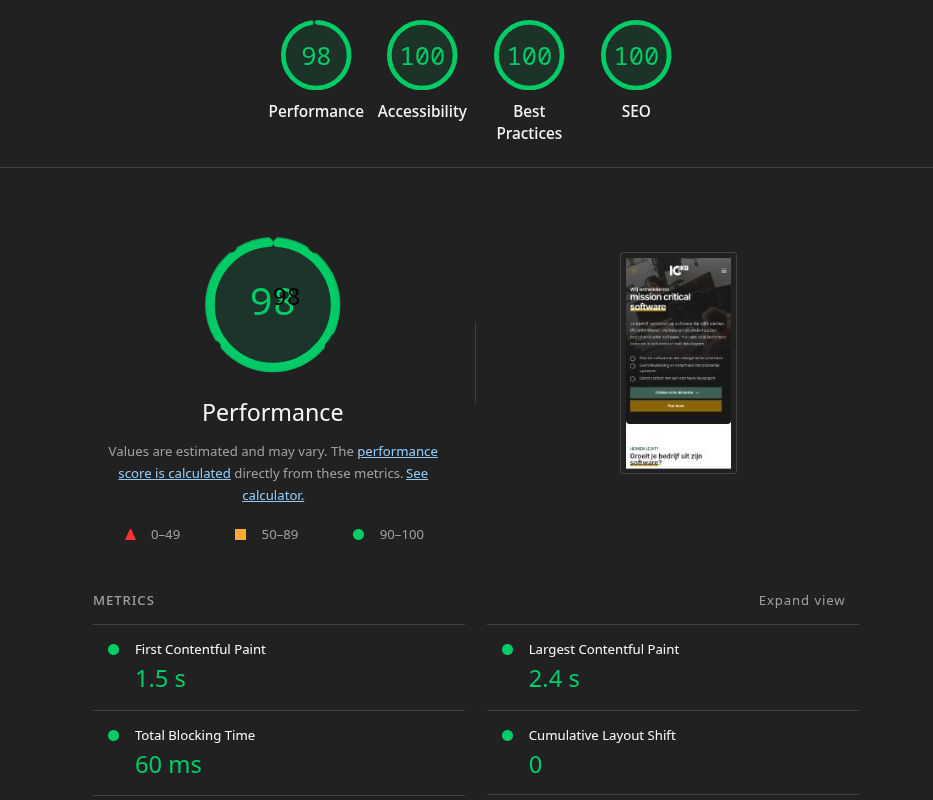
We started with two aims. The site had to be fast, with a target of 100 in all four Glossary · In briefLighthouseLighthouse is an open-source tool from Google that automatically audits web pages for performance, accessibility, best practices, SEO and more.Read more categories. This Google tool checks websites for performance, accessibility, best practices and SEO. We also wanted menus, filters, carousels and forms that make the site pleasant to use. Speed had to come from how we built the whole thing.
We also wanted to leave the Glossary · In briefCMSA CMS is software that lets users create, organize, edit and publish digital content, usually through an administration interface.Read more behind. We used Contentful and wanted to arrange each page freely. Some text next to a photo, a row of cards, a quote somewhere along the way; each page needed its own order. Contentful can model all of that perfectly well. But filling in those blocks took so much work that it was putting us off publishing new content.
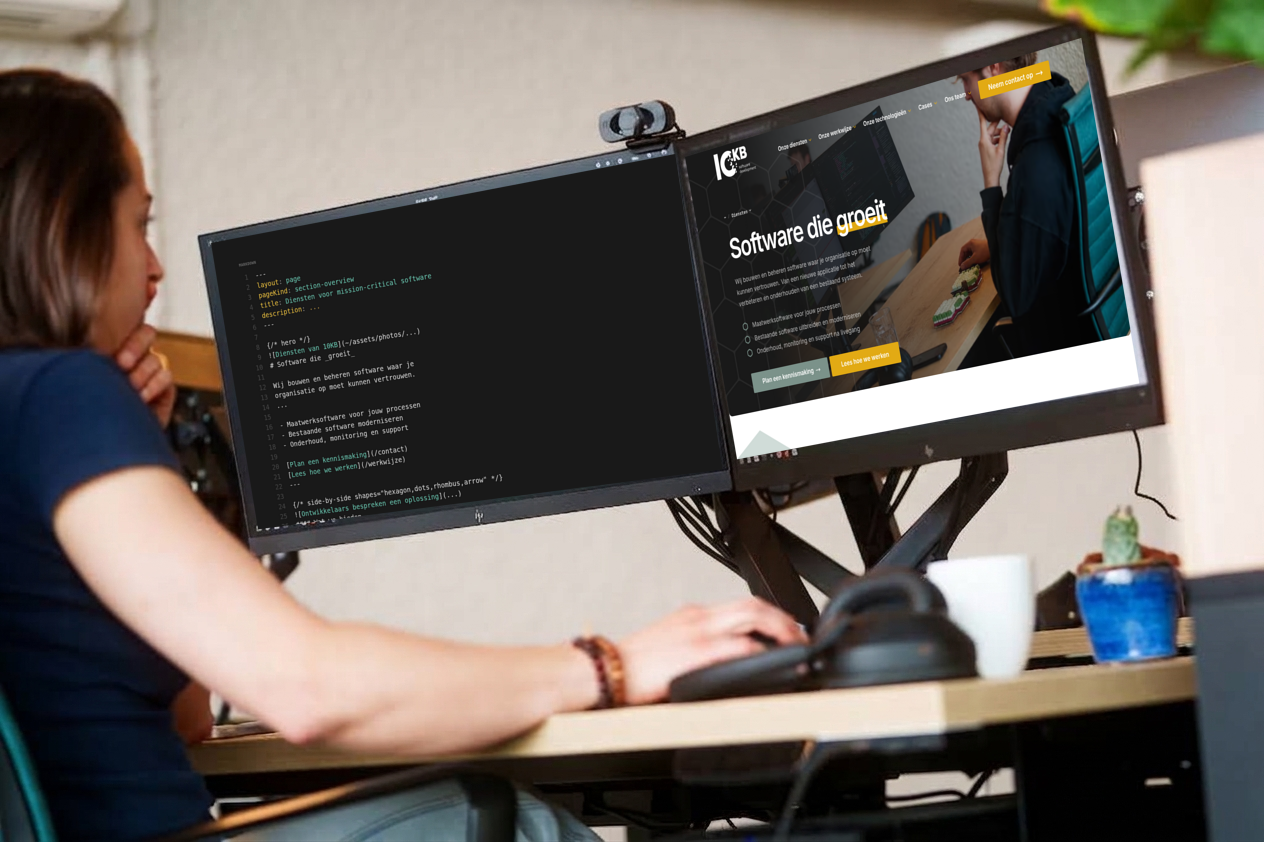
As a software agency, we spend much of our day in a text editor. We wanted to write our stories there too, with the freedom to move blocks around or insert a new one. Copy, paste, edit. That led us to the idea of storing pages as Glossary · In briefMarkdownMarkdown is a way to add structure to plain text using simple characters, for example for headings, lists, emphasis, and links.Read more and letting the website handle their appearance.
The question behind the question
How much website fits in a text file?
We started with Qwik and a set of reusable components. Markdown came along first for articles. That worked well enough that we eventually wanted to write every page that way. A hash for a heading, a dash for a list, and the occasional instruction for the layout: put this text next to an image, turn these items into cards or show a carousel here.
We use Glossary · In briefMDXMDX is a file format that lets you combine Markdown with JSX, JavaScript expressions, and import and export statements.Read more to combine Markdown with components. Our own plugins translate the instructions into the right components when the website is built. The components define the design, so we don't have to work it out again for the next story.
Why we like working in text
The benefits of text files become clear when you want to change something. We can search every page, replace a term throughout the site or compare two versions. Glossary · In briefversion controlVersion control records changes to code, including who changed what and when. It lets developers collaborate, compare changes and return to an earlier version.Read more shows exactly which sentences changed. A colleague can comment before the change goes live, and we can bring an earlier version back. All from the editor we already use.
The same files are useful to scripts and AI Glossary · In briefagentAn AI agent is software that uses a language model and tools to carry out a task. It chooses its next steps based on the goal and the results of earlier steps.Read more. An agent can read existing pages alongside our writing guidelines and components. It doesn't need to operate a CMS or guess which input field belongs to which part of a page. The result is still a change to a readable file that we can review.
This fits into something we're doing more broadly at 10KB: Glossary · In briefcompany as codeCompany as code is an approach to recording company knowledge, processes and settings in text files and code. This lets you manage them with version control, checks and automation.Read more. Our website lives in Glossary · In brief42KB42KB is the central repository of 10KB for code, company knowledge, documentation and internal tools. It is where we put our company as code approach into practice.Read more, the repository where we also keep company knowledge, handbooks, working practices and infrastructure. We use version control and automated checks for things you might otherwise expect to find in a separate documents folder. That makes knowledge easier to find and use on the next job. We'll share more about 42KB and company as code in upcoming blog posts.
From instructions to a page
Below, you can compare an abridged MDX file with our complete Dutch services page. Point to a section to see which lines belong to it, or start with the source and find the result. Press Tab to move to the next block or Shift+Tab to go back. The focused block is highlighted immediately. Escape clears the highlight; on a touchscreen, tap a block.
The MDX source
---
layout: page
title: Diensten voor mission-critical software
---
{/* hero */}

# Software die _groeit_
Wij bouwen en beheren software waar je ...
- Maatwerksoftware voor jouw processen
- ...
[Plan een kennismaking](/contact)
---
{/* side-by-side shapes="hexagon,dots" */}

#### Wat we bieden
## Een _oplossing_ voor jouw situatie
Onze opdrachtgevers willen een nieuw proces
ondersteunen, een eigen SaaS-platform bouwen of
verder met bestaande software waarvan de
technische basis tekortschiet. ...
We helpen die situatie weer beheersbaar te maken
met **software ontwikkeling**, gerichte
**doorontwikkeling** of **onderhoud en support**,
afhankelijk van wat je huidige situatie nodig heeft.
...
---
{/* feature-section gridPattern="both" */}
#### Onze dienstverlening
## De _kern_ van wat we doen
{/* feature icon="pencil" */}
### Software ontwikkeling
Software op maat bouwen, of ...
[Meer weten](/diensten/software-ontwikkeling)
{/* feature icon="settings" */}
### Structurele doorontwikkeling
Bestaande software onderhouden, uitbreiden en ...
[Meer weten](/diensten/structurele-doorontwikkeling)
{/* feature icon="shield-alert" */}
### Onderhoud en support
Monitoring, onderhoud en support voor ...
[Meer weten](/diensten/onderhoud-en-support)
---
{/* side-by-side shapes="hexagon,dots" */}

#### Keuzehulp
## Ontwikkelen of _doorbouwen_?
Soms is een nieuwe oplossing de verstandigste stap.
Soms is doorontwikkelen op bestaande software
juist veel logischer. De juiste route hangt af
van veranderbaarheid, technische schuld, ...
Benieuwd welke route bij jouw project past?
{/* icon="arrow-right" */}
[Naar de keuzehulp](/diensten/...)
---
{/* testimonial-carousel gridPattern="both" */}
{/* testimonial */}
## 10KB is een betrouwbare en deskundige partner ...

### Roos Rietveld
Directeur bij Planned Culture
{/* testimonial */}
## Ze denken echt mee en ontwikkelen niet zomaar ...

### Esther Radder
Productmanager Werkplanner
...
---
{/* side-by-side shapes="hexagon,dots,rhombus" */}

#### Onze werkwijze
## Hoe _samenwerking_ eruitziet
In de praktijk werken we vaak als ontwikkelteam
op afstand met een flexibele maandplanning.
Voor het einde van de maand bepalen we samen
welk werk prioriteit heeft en hoeveel inzet
daarvoor logisch is in de volgende periode. ...
We werken op [nacalculatie](/woordenboek/nacalculatie):
je krijgt inzicht in de daadwerkelijk bestede uren.
Je werkt rechtstreeks met developers. ...
[Lees meer over onze werkwijze](/werkwijze)
---
{/* case-study-carousel placement="generic" limit="6" */}
#### Ons werk
## Diensten in de _praktijk_
Voorbeelden van samenwerkingen waarin
ontwikkeling, doorontwikkeling of onderhoud
en support het verschil maakten voor software
waar veel van afhangt.
[Naar onze cases](/cases)
---
{/* faq contentWidth="default" */}
## Veelgestelde _vragen_
### Bouwen jullie ook nieuwe software?
Ja. We bouwen nieuwe webapplicaties, portalen
en platforms op maat. ...
### Wat is het verschil tussen ontwikkeling, ...?
Softwareontwikkeling gaat over een nieuwe
applicatie of een nieuwe technische basis. ...
...
[Neem contact op](/contact)
---
The services page

Point to a block in the source or the page to compare them. Text and image paths are shortened with ...; navigation, the contact form and footer come from the shared layout.
The plugins read Markdown as a syntax tree: they know which bit is a heading, which is a paragraph and where an image sits. That lets them collect the heading and text below a side-by-side instruction and pass them to the right component. The author writes the content and chooses the pattern. The plugin translates it into the website.
At the top of the file, between the dashes, is the Glossary · In brieffrontmatterFrontmatter is a block of metadata at the beginning of a content file, usually read by the tool that processes the file.Read more: the title, description and main image, for example. We've taken some work out of this part too. Our frontmatter plugins connect language versions, generate breadcrumbs and SEO data, calculate reading time and find related articles. They can look at other pages to do this. A central list of cases feeds the case carousels, so we don't have to enter the same card in several places. The plugins also run in a defined order: first establish the language and tags, then look for related articles.
Technology that makes the difference
The browser already has enough to do
A good-looking page soon fills up with large photos, fonts and JavaScript for all the interactions. Downloading and running that takes time, especially on a phone. So we kept coming back to the same question: what really needs to happen on the visitor's device, and what can we finish before they arrive?
That starts with Qwik. We build pages ahead of time as HTML, including the information needed to respond to a click later. Visitors get a page they can read straight away. Interactive parts can resume their work when needed.
Resuming a page without hydration
Many frameworks deliver HTML first, then run the component code again in the browser to make the page interactive. Among other things, they restore which button belongs to which function and the application's current state. This is called Glossary · In briefhydrationHydration is the process of connecting server-rendered HTML with client-side code and application state to make a page interactive.Read more. The page may already be visible while the browser is still getting it ready to use.
Qwik stores that information with the HTML. A button effectively carries the address of the code it needs. The framework doesn't have to revisit every component when someone arrives. This approach is called resumability. Think of loading a saved game: you pick up where you left off, with the necessary state already recorded.
There is still JavaScript. The menu needs to open and the form needs to respond. What changes is when the code is needed. We can split it up and load it selectively, so a visitor doesn't have to download the workings of the entire page before reading the first paragraph.
One photo becomes several files
We do much of the image work during the build, when the source files are turned into the website we're going to publish. A large photo is resized and compressed into several variants. We do that calculation when we publish; visitors receive files that are already waiting for them.
The right variant depends on both the space the image occupies and the screen showing it. A phone usually needs fewer pixels than a large monitor, though a sharp phone display can have a higher pixel density. Our image pipeline therefore works with the actual widths of components and creates variants for different screen sizes and pixel densities.
With srcset, we give the browser a list of those files to choose from. With sizes, we tell it how much room the image will take up in the layout. That second detail mattered: if the browser thinks an image will be wider than it really is, it still picks an oversized file. We refined the widths specified for mobile heroes and added a smaller 384-pixel variant. The main image also has its own mobile crop.
Load the first screen first
Even a small file can arrive too late. The large image at the top needs to appear quickly; a photo at the bottom can wait. We give the first screen priority. A preload announces the hero image early, so the browser can start fetching it before it reaches the image itself. That announcement uses the same image variants as the hero. Otherwise, a phone could accidentally download two files.
Images further down use lazy loading: the browser fetches them as they approach the visible area. Their dimensions are already in the HTML, so it can reserve space. That keeps text from jumping down the page as images arrive.
We also worked on the styling. CSS defines how the page looks. The part needed for the first view comes with the HTML; the remaining styles can follow later. Vanilla Extract generates CSS during the build, and we serve fonts as compact local WOFF2 files. With font-display: optional, the browser can stick with an available font on a slow connection. It doesn't have to shift the text later to fit our font.
Fewer downloads aren't always faster
Optimisation brought a few surprises. Our general page route initially imported all MDX pages at once. That was convenient to begin with, but a visitor was coming for one page. We separated the server's metadata from the loaders for page content. We also import icons explicitly now, so one small icon doesn't accidentally pull in a whole collection of code. And we separated helpers used to build stylesheets from the code that goes to the browser.
We initially took a wrong turn with Qwik's preloader. It fetches code that may be needed shortly. Turning it off saved downloads on arrival, but when visitors clicked through, the browser had to fetch files one after another. Navigation felt slower. The preloader is now back on, and we've improved how the JavaScript bundles are grouped.
That's why we look beyond the first load. The next click, opening a menu and filling in a form all matter to how fast a website feels.
What it made possible
Room for the next story
The site is live, and publishing now starts with a text file. A short article and a long page full of photos, quotes and interactive sections go through the same build. The resulting files live on S3, with CloudFront as the CDN: a network that delivers them to visitors. Reading a page doesn't require a server to consult a CMS first. Only the contact form still needs a separate API to send messages.
Our post about over-engineering the Christmas dinner shows what this approach makes possible. It's a long story, with plenty of images and digressions. The source remains an ordinary document we can work on together. Shared components make it fit together on the website.

What the measurement shows
The Lighthouse report shows 98 for performance and 100 for accessibility, best practices and SEO. This test simulates a slow phone with a slow internet connection. In that run, the first content appears after 1.5 seconds, and the largest visible element after 2.4 seconds. Total blocking time is 60 milliseconds, with a layout shift score of 0. Content appears while the rest loads, with very little blocking work and no layout shifts in this measurement.
Those last two details matter as much as a high score. A page that looks loaded but doesn't respond to a tap still feels slow. And nobody enjoys a button moving just as they're about to press it. We also check for ourselves that the menu responds immediately and the next page opens quickly.
Back to writing
It took us a while, but the way we maintain the site now suits us. Text, components and publishing are part of the same Glossary · In briefworkflowAn agreed sequence of tasks, decisions and handovers used to take work from start to finish.Read more. An improvement to a component benefits several pages, and for each new story we can put the blocks in the order it needs. That's exactly what we used to struggle with in Contentful.
Our own website will probably never be completely finished. There's always another detail to improve or a download to make smaller. But the next time we have something to say, the technology will get in our way a lot less.
What we learned
Speed depends on the whole page
A lightweight framework helps, but images, styles and the order in which the browser receives them matter too. These are the lessons we'll take into future projects.
Do the work before the visitor arrives
We generate HTML, CSS and image variants when we publish. Qwik resumes interactions without hydrating the entire page.
In practice
Decide early which work can happen in advance. That saves downloads and processing time for every visitor.
Give the first screen priority
The hero gets an appropriately sized image and an early preload. Images further down needn't delay the first view.
In practice
Check which files the first screen needs and keep them from competing with things that can wait.
Measure the next click too
Disabling the preloader reduced the initial download but slowed down navigation. We turned it back on and adjusted the bundles.
In practice
Test a whole visit. A good score on arrival matters more when menus, forms and the next page feel fast too.
Ewout

What's slowing your website down?
Sometimes it's the images, sometimes it's the code the browser has to run first. We'd be happy to help you find out where the time goes.